Social Media Marketing is one of the fastest-growing career opportunities in 2026, with businesses actively hiring professionals to manage Facebook, Instagram, LinkedIn, and YouTube. If you’re preparing for your first job, practicing the latest Social Media Marketing Interview Questions can help you build confidence and perform better in interviews.
Today, recruiters ask a mix of Social Media Questions for Interview, practical tasks, and Meta Ads Interview Questions to evaluate your understanding of content creation, audience targeting, campaign optimization, and analytics. Some companies also include Facebook Interview Questions and platform-specific scenarios to assess your hands-on knowledge.
This comprehensive guide covers 120+ Social Media Marketing Interview Questions with expert answers, real-world examples, and the latest 2026 updates. Whether you’re a student, marketing intern, career switcher, or preparing for SMM Interview Questions, this guide will help you strengthen your skills and increase your chances of landing your first Social Media Marketing job.
If you’re preparing for a Digital Marketing career, you should also explore our Digital Marketing Interview Questions for Freshers guide to build a strong foundation before attending interviews.
Top 120+ Social Media Marketing Interview Questions and Answers (Updated 2026).
1. What is Social Media Marketing?
Social Media Marketing (SMM) is the process of promoting a business, brand, product, or service through social media platforms like Facebook, Instagram, LinkedIn, YouTube, Pinterest, and X (formerly Twitter). It involves creating valuable content, engaging with audiences, building brand awareness, generating leads, and increasing sales through both organic strategies and paid advertising. A successful social media strategy focuses on delivering value while achieving business goals.
2. What is Social Media Management?
Social Media Management is the process of planning, creating, publishing, monitoring, and optimizing content across social media platforms. It includes scheduling posts, responding to comments and messages, analyzing performance, managing online communities, and maintaining a consistent brand voice. Social media managers also review analytics to improve future content and ensure marketing objectives are achieved.
3. What is the difference between Digital Marketing and Social Media Marketing?
Digital Marketing is a broad marketing discipline that includes SEO, Google Ads, email marketing, content marketing, affiliate marketing, social media marketing, and more. Social Media Marketing is one part of digital marketing that focuses specifically on promoting businesses through social platforms. While digital marketing covers multiple online channels, social media marketing primarily builds relationships, engagement, and brand awareness through social networks.
4. Why is Social Media Marketing important for businesses?
Social Media Marketing helps businesses increase brand visibility, connect with potential customers, build trust, generate leads, and improve sales. It allows companies to communicate directly with their audience through engaging content, comments, messages, and advertisements. Since billions of people use social media daily, businesses can reach highly targeted audiences while measuring campaign performance using real-time analytics.
5. How does Social Media Marketing help businesses grow?
Social Media Marketing supports business growth by attracting new customers, increasing website traffic, strengthening customer relationships, and encouraging repeat purchases. Businesses can educate their audience, showcase products, collect customer feedback, and run targeted advertising campaigns. Regular engagement and valuable content improve brand recognition, while analytics help marketers optimize campaigns for better results.
6. What are the major social media platforms used for marketing?
The most popular social media platforms for marketing include Facebook, Instagram, LinkedIn, YouTube, X (formerly Twitter), Pinterest, Snapchat, and TikTok (where available). Each platform serves a different purpose. Instagram is ideal for visual content, LinkedIn is effective for B2B marketing, YouTube supports educational and long-form videos, while Facebook remains a strong platform for community building and paid advertising.
7. Which social media platform do you like the most and why?
I prefer Instagram because it offers multiple content formats such as Reels, Stories, Carousels, Posts, and Live sessions, making it suitable for different marketing objectives. Its strong visual appeal, engagement opportunities, creator ecosystem, and integration with Meta Ads help businesses build brand awareness and generate leads. However, the best platform ultimately depends on the target audience and business goals.
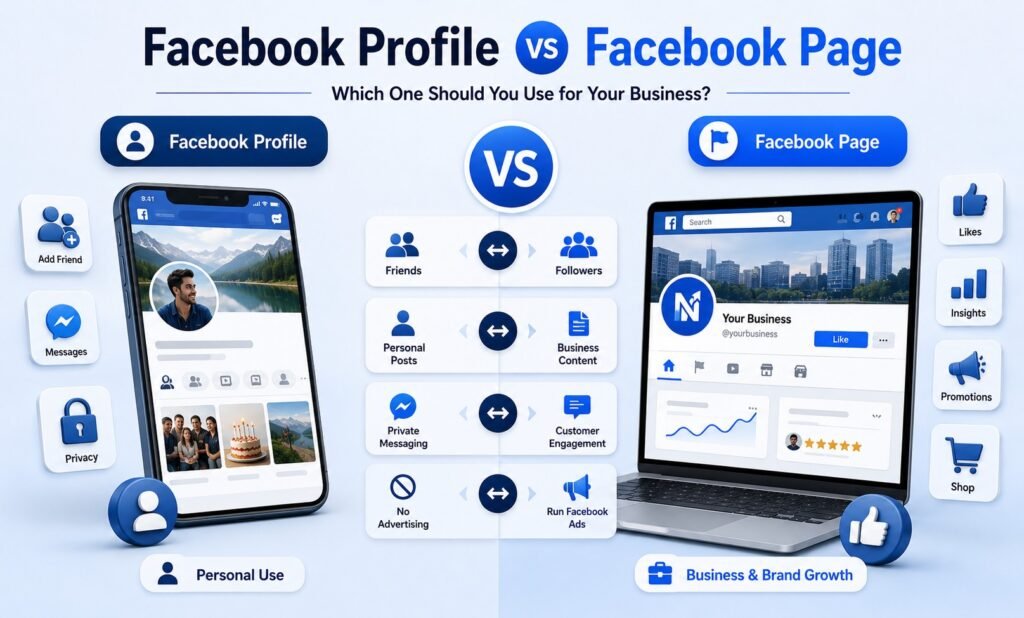
8. What is the difference between a Facebook Profile and a Facebook Page?
A Facebook Profile is designed for personal use, allowing individuals to connect with friends and family. A Facebook Page is created for businesses, brands, public figures, or organizations. Business Pages provide professional features such as Insights, Meta Ads integration, messaging tools, content scheduling, and multiple admin access, making them suitable for marketing and customer engagement.
9. What is the difference between B2B and B2C marketing?
B2B (Business-to-Business) marketing targets other businesses, while B2C (Business-to-Consumer) marketing focuses on individual customers. B2B marketing emphasizes expertise, long-term relationships, and return on investment. B2C marketing is more emotional, visual, and purchase-driven. Social media strategies, messaging, content style, and platform selection often differ depending on the audience.
10. What is LinkedIn Marketing?
LinkedIn Marketing is the practice of promoting businesses, services, or professional brands through LinkedIn. It is widely used for B2B marketing, employer branding, lead generation, networking, and sharing industry knowledge. Companies use LinkedIn to publish thought leadership content, generate qualified business leads, recruit talent, and build professional relationships with decision-makers and industry experts.
11. What are the benefits of LinkedIn for businesses?
LinkedIn is a powerful platform for B2B marketing, professional networking, employer branding, and lead generation. Businesses can connect with industry professionals, decision-makers, and potential clients while sharing valuable content to build credibility. It also helps companies recruit skilled employees, promote products or services, generate qualified leads, and establish themselves as thought leaders within their industry.
Learning through live projects is one of the best ways to build confidence. A Digital Marketing Course in Ahmedabad provides hands-on training in Social Media Marketing, Meta Ads, SEO, Google Ads, and AI-powered marketing tools.
12. What is a Social Media Content Calendar?
A Social Media Content Calendar is a planned schedule that organizes what content will be published, on which platform, and on what date and time. It helps marketers maintain consistency, plan campaigns, avoid last-minute posting, and align content with business goals, festivals, product launches, and marketing events. A well-structured calendar improves workflow and content quality.
13. How do you create a Social Media Content Calendar?
To create a Social Media Content Calendar, first identify your marketing goals and target audience. Decide which social media platforms you will use, then plan content categories such as educational, promotional, entertaining, testimonials, and behind-the-scenes posts. Schedule publishing dates, prepare creatives in advance, write captions, include relevant hashtags, and review performance regularly to optimize future content.
14. What types of content can you post on social media?
Businesses can publish various types of content depending on their audience and objectives. Popular content includes educational posts, product promotions, customer testimonials, behind-the-scenes updates, infographics, Reels, Stories, carousel posts, videos, polls, quizzes, live sessions, user-generated content, industry news, FAQs, contests, and seasonal or festival-related campaigns to keep audiences engaged.
15. What are Instagram post formats?
Instagram offers multiple content formats to help businesses engage different audiences. These include single image posts, carousel posts, Reels, Stories, Live videos, broadcast channels, and collaborative posts. Each format serves a different purpose. For example, Reels improve organic reach, carousel posts are ideal for educational content, while Stories encourage daily engagement through interactive stickers and polls.
16. What is a Cover Image?
A Cover Image is the large banner displayed at the top of a social media profile, such as a Facebook Page or LinkedIn Company Page. It represents the brand visually and often highlights products, services, offers, events, or company values. A professional cover image should match the brand identity, use high-quality visuals, and be updated whenever major campaigns or promotions change.
17. What is a Thumbnail?
A Thumbnail is the preview image displayed before someone opens a video on platforms like YouTube and Facebook. It plays an important role in attracting clicks because it is the first visual users notice. An effective thumbnail uses high-quality images, readable text, consistent branding, and contrasting colors to encourage viewers to watch the content.
18. What is the ideal posting frequency for social media?
The ideal posting frequency depends on the platform, audience behavior, and content quality. Instead of posting excessively, businesses should focus on consistency and value. A practical schedule is three to five Instagram posts per week, daily Stories, two to four Facebook posts weekly, three to five LinkedIn posts weekly, and one to three YouTube videos each week, depending on available resources.
19. What is the best time to post on social media?
There is no universal best time to post because audience behavior differs across industries and regions. Businesses should study platform analytics to identify when their followers are most active. Generally, early mornings, lunch hours, and evenings tend to perform well. Regular testing and analyzing engagement data help determine the most effective posting schedule for a specific audience.
20. Which Social Media Management tools have you used?
I am familiar with several Social Media Management tools that help schedule content, monitor engagement, analyze performance, and improve productivity. These include Meta Business Suite for Facebook and Instagram management, Canva for designing creatives, CapCut for video editing, ChatGPT for content ideas and captions, Google Analytics for website insights, and Google Sheets for planning content calendars. Learning multiple tools improves efficiency and campaign management.
21. How do you grow a new social media account organically?
Growing a new social media account organically requires consistency, valuable content, and audience engagement. Start by identifying your target audience and creating content that solves their problems or entertains them. Post regularly, use relevant hashtags, interact with followers through comments and messages, collaborate with creators, and analyze performance to improve future posts. Organic growth takes time, but consistent efforts build a loyal community.
22. What organic strategies improve Instagram growth?
Instagram growth improves when you consistently publish high-quality Reels, carousel posts, Stories, and engaging captions. Use relevant hashtags, trending audio, collaboration posts, and location tags where appropriate. Reply to comments, encourage conversations, post consistently, and monitor Insights to understand audience behavior. Creating educational and shareable content usually delivers better long-term organic reach.
23. How do you increase Facebook Page engagement?
Facebook Page engagement increases when you share valuable and interactive content. Publish videos, images, polls, quizzes, behind-the-scenes updates, customer stories, and educational posts. Respond to comments quickly, ask questions in captions, post consistently, and encourage followers to share their opinions. Understanding Facebook Insights also helps identify the content that performs best.
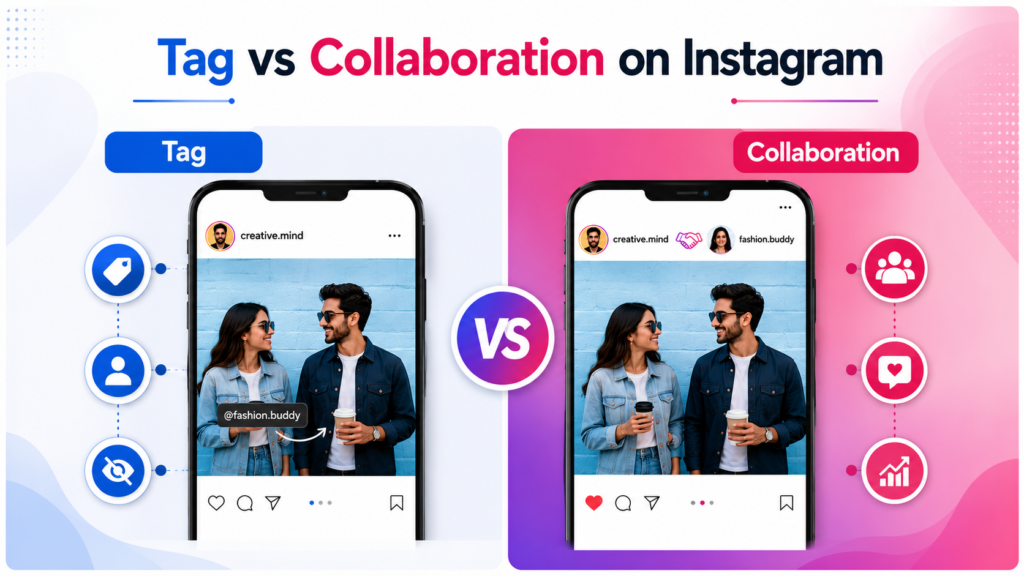
24. What is the difference between Tag and Collaboration on Instagram?
Tagging allows you to mention another Instagram account in a post, Reel, or Story so users can easily visit that profile. A Collaboration post, however, allows two accounts to publish the same content together. The post appears on both profiles, and engagement such as likes, comments, and shares is combined, helping both accounts increase visibility.
25. How many people can you tag in an Instagram post?
Instagram allows users to tag multiple accounts in a single post. Currently, you can tag up to 20 people or accounts in one feed post. Tags help increase visibility, notify the tagged accounts, and improve discoverability when used appropriately. Businesses often tag customers, collaborators, influencers, or product partners to expand reach.
26. How many collaborators can you add to an Instagram post?
Instagram allows creators to invite multiple collaborators on eligible posts and Reels. As of recent platform updates, you can invite up to five collaborators, allowing the content to appear across participating profiles once accepted. This feature helps brands, influencers, and businesses reach larger audiences through shared engagement.
27. How many hashtags should you use on Instagram?
Although Instagram allows up to 30 hashtags per post, using the maximum number is not always necessary. A focused set of 5 to 10 highly relevant hashtags generally produces better results. Choose hashtags that match your content, industry, target audience, and niche instead of using unrelated or overly popular hashtags.
28. How do you select the right hashtags?
The best hashtags are relevant to your content and audience. Use a combination of broad, niche, branded, and location-based hashtags where appropriate. Analyze competitors, research trending topics within your industry, and review Instagram search suggestions. Avoid using irrelevant hashtags simply because they are popular, as they may reduce content quality and engagement.
29. Which tools help you find hashtags?
Several tools help marketers discover relevant hashtags for different industries. Instagram Search provides keyword suggestions, while tools like Meta Business Suite, Canva, ChatGPT, and keyword research platforms can assist with content planning. Monitoring competitors and industry influencers is also an effective way to identify hashtags that are relevant to your audience.
30. How do you find trending audio for Instagram Reels?
Trending audio can be found by exploring the Reels feed, checking Instagram’s trending music indicators, following creators in your niche, and monitoring popular content. Using relevant trending audio can improve discoverability, but it should match your content and brand message. Always ensure you have permission to use audio for business purposes when required.
31. How do you increase followers organically?
Organic follower growth comes from creating valuable content consistently and engaging with your audience. Publish educational posts, entertaining Reels, carousel content, and Stories while responding to comments and messages. Collaborate with creators, encourage user-generated content, optimize your profile, and maintain a consistent posting schedule to build long-term trust and community.
32. How do you increase engagement on social media?
Engagement increases when content encourages users to interact. Ask questions, create polls, share quizzes, post behind-the-scenes content, publish relatable videos, and invite followers to comment or share their opinions. Responding quickly to comments and messages also builds stronger relationships and encourages future interactions with your content.
33. What content works best for organic reach?
Content that educates, entertains, or solves problems generally performs well organically. Reels, carousel posts, tutorials, industry tips, case studies, customer success stories, FAQs, and behind-the-scenes content often receive higher engagement. High-quality visuals, strong opening hooks, and clear value increase the chances of content being shared and recommended.
34. How do Instagram Reels help growth?
Instagram Reels help businesses reach audiences beyond their existing followers. The platform recommends engaging Reels through the Explore page and Reels feed, increasing visibility. Short, informative, entertaining, or trend-based videos often perform well. Using clear captions, engaging visuals, and consistent branding further improves the chances of organic growth.
35. What are the latest Instagram updates in 2026?
Instagram continues to prioritize short-form video, creator collaboration, AI-assisted content creation, personalized recommendations, and improved messaging features. Businesses should focus on authentic content, educational Reels, collaborative posts, community engagement, and analytics. The platform also continues enhancing creator tools, business insights, and shopping experiences to support brands and creators.
36. What are the latest Facebook updates in 2026?
Facebook continues improving AI-powered content recommendations, business messaging, community engagement features, and advertising capabilities. Businesses benefit from better integration with Meta Business Suite, enhanced video experiences, improved analytics, and more efficient campaign optimization. Facebook Groups and professional content remain valuable for building loyal communities and increasing organic engagement.
37. What are the latest YouTube updates in 2026?
YouTube continues investing in Shorts, AI-powered creator tools, enhanced analytics, improved recommendations, and better monetization opportunities. Businesses should create high-quality thumbnails, optimize titles and descriptions, publish valuable long-form videos, and use Shorts to reach new audiences. Consistent publishing and audience retention remain important ranking factors.
38. What should you consider before uploading a YouTube video?
Before publishing a YouTube video, ensure the title is clear, the thumbnail is attractive, and the description includes relevant keywords. Add appropriate tags, chapters, subtitles, and a strong call-to-action. Review video quality, audio clarity, and copyright compliance before publishing. Optimizing every element improves discoverability and viewer experience.
39. What is a YouTube Tag?
A YouTube Tag is a keyword or phrase added to a video’s metadata to provide additional context about its content. Tags help YouTube better understand the topic, although titles, descriptions, thumbnails, and audience engagement have a greater impact on search visibility. Tags should always be relevant and accurately describe the video’s subject.
40. How do you connect Facebook and Instagram accounts?
Facebook and Instagram accounts can be connected through Meta Accounts Center or Meta Business Suite. After linking both accounts, businesses can publish content across platforms, manage messages from one dashboard, run Meta Ads, access shared insights, and simplify social media management. Connecting both accounts improves workflow efficiency and supports integrated marketing campaigns.
41. What is Meta Business Suite?
Meta Business Suite is a free business management platform developed by Meta that helps businesses manage their Facebook and Instagram accounts from one dashboard. It allows users to schedule posts, reply to messages and comments, view performance insights, manage notifications, and monitor business activities efficiently. It simplifies daily social media management for businesses of all sizes.
42. What are the features of Meta Business Suite?
Meta Business Suite offers several features that help businesses manage their social media presence effectively. These include content scheduling, inbox management, performance insights, post and Reel publishing, audience analytics, ad management shortcuts, notifications, and collaboration tools for multiple team members. It saves time by allowing businesses to manage Facebook and Instagram together.
43. What is Meta Ads Manager?
Meta Ads Manager is the advertising platform used to create, manage, monitor, and optimize advertising campaigns across Facebook, Instagram, Messenger, and the Meta Audience Network. It provides advanced targeting options, budgeting controls, campaign objectives, performance reports, and A/B testing features, making it the primary tool for running Meta advertising campaigns.
44. What is the minimum requirement to run Meta Ads?
To run Meta Ads, you need a Facebook account, a Meta Business account, a Facebook Page or Instagram Professional account, a valid payment method, and access to Meta Ads Manager. For website conversion campaigns, installing the Meta Pixel or relevant tracking setup is also recommended to measure campaign performance accurately.
45. What is Business Manager in Meta?
Meta Business Manager is a platform that allows businesses to securely manage Facebook Pages, Instagram accounts, ad accounts, Meta Pixels, team members, and business assets in one place. It provides role-based access, making it easy for organizations and agencies to collaborate while maintaining account security and organized asset management.
46. What is Facebook Ads Manager?
Facebook Ads Manager is the interface within Meta Ads Manager that enables advertisers to create and manage advertising campaigns for Facebook and other Meta platforms. Users can define campaign objectives, select target audiences, set budgets, upload creatives, monitor campaign performance, and optimize ads based on business goals and campaign data.
47. What is the structure of Meta Ads?
Meta Ads follow a three-level structure consisting of Campaign, Ad Set, and Ad. Each level serves a specific purpose. The Campaign defines the marketing objective, the Ad Set controls audience targeting, budget, schedule, and placements, while the Ad contains the creative elements such as images, videos, headlines, captions, and call-to-action buttons.
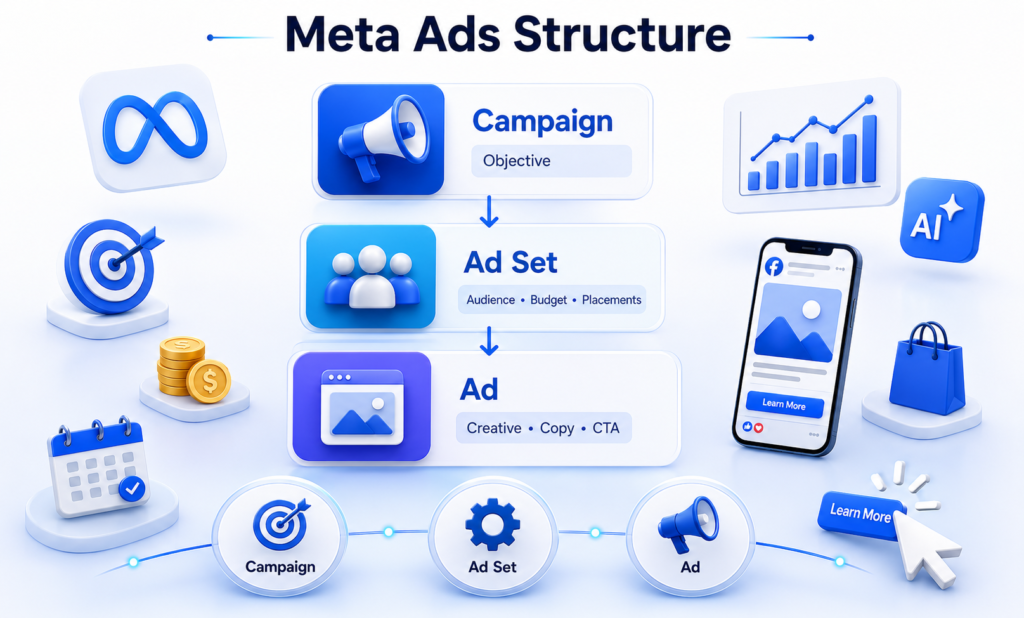
48. What are Campaign, Ad Set, and Ad levels?
The Campaign level determines the advertising objective, such as traffic or sales. The Ad Set level controls targeting, budget, placements, optimization, and scheduling. The Ad level contains the actual advertisement, including visuals, videos, primary text, headlines, descriptions, and call-to-action buttons. Understanding this structure is essential for creating well-organized Meta advertising campaigns.
49. What are Meta campaign objectives?
Meta campaign objectives define the primary goal of an advertising campaign. Businesses choose an objective based on the result they want to achieve. The six main objectives are Brand Awareness, Traffic, Engagement, Leads, App Promotion, and Sales. Selecting the correct objective helps Meta optimize ad delivery for better campaign performance.
50. Explain the Brand Awareness objective.
The Brand Awareness objective is designed to introduce a business or product to as many relevant people as possible. It helps increase brand recognition by showing ads to users who are more likely to remember them. This objective is commonly used by new businesses, product launches, and companies looking to improve visibility rather than immediate sales.
51. Explain the Traffic objective.
The Traffic objective focuses on sending users to a website, landing page, mobile app, or another online destination. It is suitable when businesses want to increase website visitors, promote blog articles, encourage product exploration, or direct users to a registration page. Success is usually measured using clicks and landing page visits.
52. Explain the Engagement objective.
The Engagement objective is used to increase interactions with social media content. It encourages users to like, comment, share, save, watch videos, respond to events, or send messages. This objective is ideal for improving community engagement, increasing post visibility, and building stronger relationships with an audience before promoting products or services.
53. Explain the Leads objective.
The Leads objective helps businesses collect valuable customer information such as names, phone numbers, email addresses, or inquiry details. Lead generation campaigns are commonly used by educational institutes, real estate companies, healthcare providers, financial services, and businesses that rely on customer inquiries before making sales.
54. Explain the App Promotion objective.
The App Promotion objective is designed to encourage users to install or engage with a mobile application. Businesses use this objective to increase app downloads, improve in-app activity, and attract users who are likely to complete valuable actions within the application. Meta optimizes delivery based on user behavior and campaign goals.
55. Explain the Sales objective.
The Sales objective focuses on generating purchases, conversions, and revenue. It is commonly used by e-commerce businesses and online stores that want customers to buy products or complete specific conversion actions. Meta uses available campaign data and optimization settings to show ads to users who are more likely to make a purchase.
56. What is the difference between Boost Post and Ads Manager?
Boost Post is a simplified advertising option that promotes an existing Facebook or Instagram post with basic targeting and budget settings. Meta Ads Manager provides advanced campaign creation, detailed audience targeting, multiple campaign objectives, placement control, conversion tracking, and performance optimization. Businesses seeking better advertising results generally prefer Ads Manager.
57. What are Meta Ad placements?
Meta Ad placements refer to the locations where advertisements appear across Meta platforms. Businesses can choose Automatic Placements, where Meta optimizes delivery, or Manual Placements, where advertisers select specific locations. Common placements include Facebook Feed, Instagram Feed, Stories, Reels, Messenger, Marketplace, In-Stream Videos, Search Results, and Audience Network.
58. What platforms can you advertise on through Meta Ads?
Meta Ads allows businesses to advertise across multiple platforms within the Meta ecosystem. These include Facebook, Instagram, Messenger, Meta Audience Network, Facebook Marketplace, Facebook Video Feeds, Instagram Explore, Instagram Reels, and Stories. This multi-platform approach helps businesses reach audiences across different user experiences while managing campaigns from a single dashboard.
59. How do you create a Meta Ads campaign step by step?
To create a Meta Ads campaign, first open Meta Ads Manager and click Create. Choose the appropriate campaign objective, define campaign settings, create an Ad Set by selecting your audience, budget, schedule, and placements. Then upload creatives, write the ad copy, add a call-to-action, review all settings, and publish the campaign. After launch, monitor performance regularly and optimize based on campaign results.
60. How do you choose the right campaign objective?
The right campaign objective depends on the business goal. If the objective is to increase brand recognition, choose Brand Awareness. For website visitors, select Traffic. Use Engagement to increase interactions, Leads to collect customer information, App Promotion for mobile applications, and Sales to generate purchases. Always define the marketing goal before selecting the campaign objective to ensure Meta optimizes ad delivery effectively.
61. What are the different audience types in Meta Ads?
Meta Ads provides three primary audience types: Saved Audience, Custom Audience, and Lookalike Audience. A Saved Audience targets people based on demographics, interests, and behaviors. A Custom Audience targets people who have already interacted with your business, while a Lookalike Audience helps you reach new users who share similar characteristics with your existing customers.
62. What is a Saved Audience?
A Saved Audience is a predefined audience created using factors such as location, age, gender, language, interests, behaviors, and demographic information. Once created, it can be reused in multiple campaigns without configuring the targeting settings again. Saved Audiences save time and help maintain consistency across advertising campaigns.
63. What is a Custom Audience?
A Custom Audience allows businesses to target people who have already interacted with their brand. These audiences may include website visitors, customer email lists, app users, video viewers, Facebook Page visitors, Instagram account engagers, or previous buyers. Custom Audiences are commonly used for remarketing and improving conversion rates.
64. What is a Lookalike Audience?
A Lookalike Audience helps businesses reach new people who share similar characteristics with an existing Custom Audience. Meta analyzes data such as interests, behaviors, and demographics to find users who resemble current customers. This audience type is commonly used to expand reach while maintaining high audience quality.
If you’re based in South Gujarat, a Digital Marketing Course in Surat can help you gain practical experience by working on real business campaigns and portfolio projects.
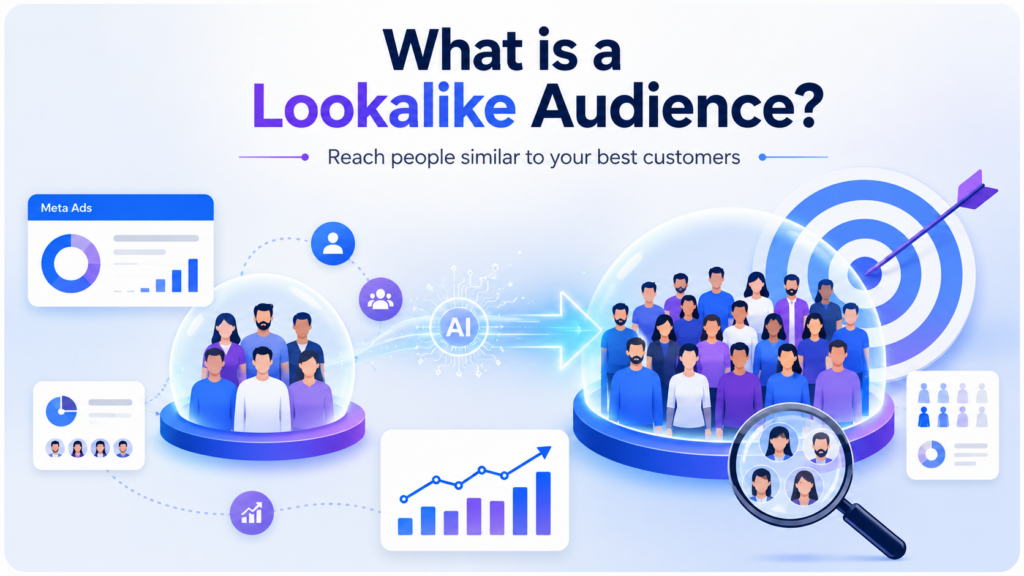
65. How do you create a Custom Audience?
To create a Custom Audience, open Meta Ads Manager or Business Manager and navigate to the Audiences section. Click Create Audience, select Custom Audience, and choose the data source such as website visitors, customer list, Instagram engagement, Facebook Page activity, or app users. Configure the audience settings and save it for future campaigns.
66. How do you create a Lookalike Audience?
To create a Lookalike Audience, first create or select an existing Custom Audience. Then choose Create Lookalike Audience, select the target country or region, and define the audience size. Meta automatically identifies new users who closely resemble your existing audience, helping businesses expand their reach efficiently.
67. What types of Custom Audiences can you create?
Meta allows businesses to create Custom Audiences from multiple data sources. These include website visitors, customer lists, app activity, Facebook Page engagement, Instagram engagement, video viewers, Lead Forms, shopping activity, and offline customer data. Choosing the right audience depends on the campaign objective and available customer information.
68. What is Interest Targeting?
Interest Targeting allows advertisers to reach users based on topics they are interested in, such as fitness, travel, fashion, education, technology, business, or sports. Meta identifies these interests using user activity and engagement across its platforms. Interest targeting is useful for reaching new audiences who are likely to be interested in your products or services.
69. What is Broad Targeting?
Broad Targeting involves providing Meta with minimal audience restrictions and allowing its machine learning system to find the most relevant users. Instead of selecting numerous interests, advertisers define basic details such as location, age, and language while Meta automatically optimizes audience delivery based on campaign performance.
70. How do you target students for a course?
To target students, first identify the appropriate age group, such as 18–30 years. Select relevant locations, languages, and educational interests. You can include interests related to colleges, universities, online learning, career development, competitive exams, and digital skills. Creating engaging educational content and using Lead Generation campaigns can further improve results.
71. How do you target customers in a specific city?
Meta Ads allows advertisers to target users based on geographic location. While creating an Ad Set, select the desired city, define a radius if needed, and choose whether to target residents, recent visitors, or people traveling in that area. Local businesses often combine city targeting with age, interests, and language filters for better campaign performance.
72. How do you target only mobile users?
During campaign setup, go to the Placement and Device settings in the Ad Set. Select Manual Placements if required and choose mobile devices only. You can further specify Android or iOS devices, operating system versions, and network types depending on the campaign objective and target audience.
73. How do you target a clothing business?
For a clothing business, define the target audience based on factors such as age, gender, location, and shopping behavior. Interest targeting may include fashion, online shopping, clothing brands, accessories, lifestyle, and seasonal trends. High-quality visuals, carousel ads, Reels, and Sales campaigns often perform well for fashion brands.
74. How do you target an interior designer business?
An interior design business should target homeowners, architects, property buyers, real estate investors, home renovation enthusiasts, furniture shoppers, and luxury home audiences. Geographic targeting is important because many interior design businesses serve specific cities or regions. Showcase completed projects, before-and-after images, and customer testimonials to attract potential clients.
75. How do you target a jewelry business?
For a jewelry business, target audiences based on demographics, purchasing behavior, fashion interests, luxury lifestyle, gifting occasions, weddings, and anniversaries. You can also create Custom Audiences from previous customers and use Lookalike Audiences to reach similar buyers. High-quality product images, videos, and seasonal campaigns generally improve campaign performance.
76. What is Meta Pixel?
Meta Pixel is a JavaScript code provided by Meta that is installed on a website to track visitor actions. It helps businesses understand user behavior, measure conversions, build Custom Audiences, create Lookalike Audiences, and optimize advertising campaigns. Meta Pixel collects valuable data that enables advertisers to improve campaign performance and make data-driven decisions.
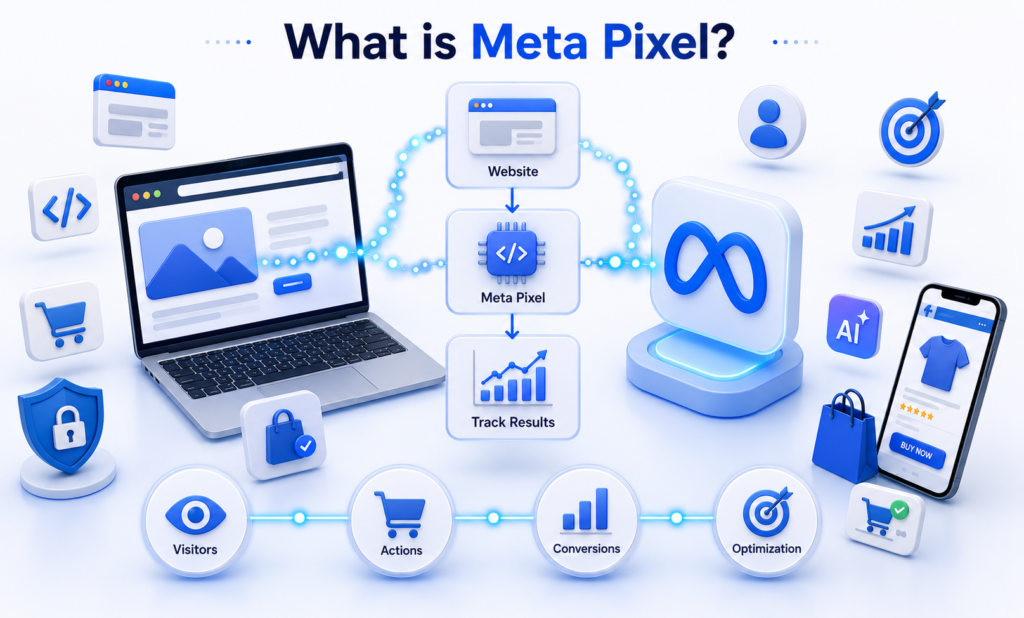
77. Why is Meta Pixel important?
Meta Pixel is important because it tracks customer actions after they click on an advertisement. It records activities such as page views, purchases, form submissions, and add-to-cart events. This data helps businesses measure campaign performance, optimize ad delivery, retarget previous visitors, and improve conversion rates through better audience insights.
78. How do you create a Meta Pixel?
To create a Meta Pixel, open Meta Events Manager and select Connect Data Sources. Choose Web, then select Meta Pixel and enter a name for the Pixel. Associate it with your website and complete the setup. Once created, install the Pixel on your website manually or through a supported platform like Shopify or WordPress.
79. How do you install Pixel on a website?
Meta Pixel can be installed manually by adding the Pixel code to the website’s header section or through integrations provided by platforms such as Shopify, WordPress, WooCommerce, Wix, or Google Tag Manager. After installation, it is important to verify that the Pixel is working correctly before launching advertising campaigns.
80. Where do you place the Pixel code?
The Meta Pixel base code should be placed inside the <head> section of every page on the website. This ensures the Pixel loads as soon as a visitor accesses the page and begins tracking user activity. Additional event codes can be placed on specific pages or triggered through Google Tag Manager based on user actions.
81. What are Data Sets in Meta Ads?
Data Sets in Meta Ads are collections of event data that combine information from multiple sources, such as websites, apps, offline activities, and CRM systems. They help businesses organize customer interaction data in one place, making it easier to measure conversions, optimize campaigns, and build more accurate audiences.
82. How do you create Data Sets?
To create a Data Set, open Meta Events Manager and choose the option to create a new Data Set. Provide a name, connect your preferred data source, and configure the required settings. Businesses can combine website events, offline events, app events, or CRM data to create a unified tracking system for campaign optimization.
83. What are Events in Meta Ads?
Events are specific actions that users perform on a website or mobile app. Meta records these actions to measure campaign effectiveness and optimize ad delivery. Common events include Page View, View Content, Add to Cart, Initiate Checkout, Purchase, Lead, Complete Registration, and Contact. These events provide valuable insights into customer behavior.
84. What is the difference between Events and Conversions?
An Event is any action a user performs, such as viewing a page or adding a product to the cart. A Conversion is a valuable event that aligns with a business objective, such as completing a purchase or submitting a lead form. While every conversion is an event, not every event is considered a business conversion.
85. How do you create Facebook Events?
Facebook Events can be created from a Facebook Page by selecting the Events section and clicking Create Event. Enter details such as the event name, date, time, location, description, cover image, and registration information. Businesses use Facebook Events to promote webinars, workshops, product launches, conferences, and community gatherings.
86. How do you test Meta Events?
Meta Events can be tested using the Test Events feature available in Meta Events Manager. After entering your website URL, perform actions such as visiting pages, submitting forms, or completing purchases. The Test Events dashboard displays whether the events are firing correctly, allowing advertisers to verify tracking before launching campaigns.
87. What is Meta Pixel Helper?
Meta Pixel Helper is a browser extension that helps verify whether the Meta Pixel is installed correctly on a website. It detects active Pixels, displays tracked events, identifies implementation errors, and provides troubleshooting information. Marketers commonly use this tool during Pixel installation and campaign setup to ensure accurate tracking.
88. What is Facebook Ads Library?
Facebook Ads Library is a public transparency tool provided by Meta that allows users to view active advertisements running across Facebook, Instagram, Messenger, and other Meta platforms. Businesses and marketers use it to research competitor advertisements, study creative ideas, analyze messaging strategies, and understand how different brands promote their products and services.
89. What is Reach?
Reach is the total number of unique people who have seen your advertisement at least once during a campaign. If one person views your ad multiple times, they are counted only once in Reach. This metric helps businesses understand how many individual users their campaign has exposed to the advertisement.
90. What is Impression?
Impressions represent the total number of times an advertisement is displayed on users’ screens. Unlike Reach, every view is counted, even if the same person sees the ad multiple times. A campaign with 1,000 Reach and 2,500 Impressions means many users viewed the advertisement more than once.
91. What is the difference between Reach and Impression?
Reach measures the number of unique users who have seen an advertisement, while Impressions count the total number of times the advertisement was displayed. One user can generate multiple impressions if they view the ad several times.
92. What is Frequency?
Frequency indicates the average number of times each person has seen your advertisement. It is calculated by dividing Impressions by Reach. A high frequency may increase brand recall, but excessive frequency can lead to ad fatigue, causing users to ignore or become frustrated with the advertisement.
93. What is CTR?
CTR (Click-Through Rate) measures the percentage of people who clicked on an advertisement after seeing it. It helps advertisers understand how attractive and relevant the ad is to the target audience. A higher CTR generally indicates that the creative, headline, and targeting are performing well.
94. What is CPC?
CPC (Cost Per Click) is the average amount an advertiser pays for each click on an advertisement. Lower CPC generally indicates better campaign efficiency, although the ideal CPC varies depending on the industry, competition, and campaign objective.
95. What is CPM?
CPM (Cost Per Mille) represents the cost of showing an advertisement 1,000 times. It measures the cost of impressions rather than clicks or conversions. CPM is commonly used for brand awareness campaigns where maximizing visibility is the primary objective.
96. What is CPL?
CPL (Cost Per Lead) measures how much it costs to generate one qualified lead through an advertising campaign. It is widely used in industries such as education, healthcare, real estate, finance, and professional services where lead generation is the primary goal.
97. What is CPP?
CPP (Cost Per Purchase) measures the average cost of acquiring one purchase through an advertising campaign. It helps e-commerce businesses evaluate how efficiently their campaigns generate sales. A lower CPP generally indicates better advertising performance and profitability.
98. What is CPR?
CPR (Cost Per Result) represents the average cost of achieving the selected campaign result, such as a lead, purchase, message, or website visit. Since Meta campaigns have different objectives, the definition of a “result” depends on the campaign goal selected during setup.
99. What is ROI?
ROI (Return on Investment) measures the profitability of a marketing campaign by comparing revenue generated with the total investment. A positive ROI indicates that the campaign earned more than it cost, while a negative ROI suggests the campaign needs optimization.
100. What is ROAS?
ROAS (Return on Ad Spend) measures the revenue generated for every amount spent on advertising. It is one of the most important metrics for e-commerce and performance marketing because it directly evaluates advertising effectiveness.
101. What is Recall Lift?
Recall Lift estimates how likely people are to remember an advertisement after viewing it. It is commonly used in Brand Awareness campaigns to measure the effectiveness of advertising in improving brand recognition. Higher Recall Lift indicates stronger brand memorability among the target audience.
Along with ChatGPT and Canva AI, marketers should understand Agentic AI in Marketing, where AI agents can automate repetitive marketing tasks, analyze campaign performance, and assist with strategic decision-making.
102. What is ThruPlay?
ThruPlay is a Meta video metric that measures the number of times a video advertisement is watched to completion or for at least 15 seconds if the video is longer than 15 seconds. It helps advertisers evaluate video engagement and audience interest.
103. What is a Conversion?
A Conversion is a valuable action completed by a user that aligns with a business objective. Examples include purchasing a product, submitting a lead form, registering for a webinar, downloading an application, or completing a contact form. Conversion tracking helps businesses measure campaign success and optimize future advertising efforts.
104. What is Average Order Value (AOV)?
Average Order Value (AOV) measures the average amount customers spend in a single purchase. Businesses use AOV to evaluate customer purchasing behavior and identify opportunities to increase revenue through upselling, cross-selling, and product bundles.
105. Which metrics do you monitor to optimize campaigns?
The metrics I monitor depend on the campaign objective, but the most important ones include Reach, Impressions, CTR, CPC, CPM, CPL, ROAS, Conversion Rate, Frequency, Cost Per Purchase, and Engagement Rate. Monitoring these metrics helps identify performance issues and optimize targeting, creatives, budgets, and bidding strategies.
106. How do you reduce CPC?
To reduce CPC, improve the quality of your ad creatives, write compelling ad copy, and target the right audience. Test multiple creatives using A/B testing, optimize landing pages, improve relevance, and remove underperforming ads. Higher engagement often leads to lower click costs because Meta rewards relevant advertisements.
107. How do you reduce CPM?
Reducing CPM involves improving audience relevance and ad quality. Use engaging creatives, refine audience targeting, test different placements, avoid audience overlap, and refresh advertisements regularly to prevent ad fatigue. Campaigns with higher engagement and better relevance scores often achieve lower CPM over time.
108. How do you reduce CPL?
To reduce Cost Per Lead, focus on targeting the right audience, using a compelling offer, writing persuasive ad copy, and optimizing your lead form or landing page. Regularly test different creatives, headlines, audiences, and call-to-action buttons. Reviewing campaign data and eliminating underperforming ads also helps lower CPL while maintaining lead quality.
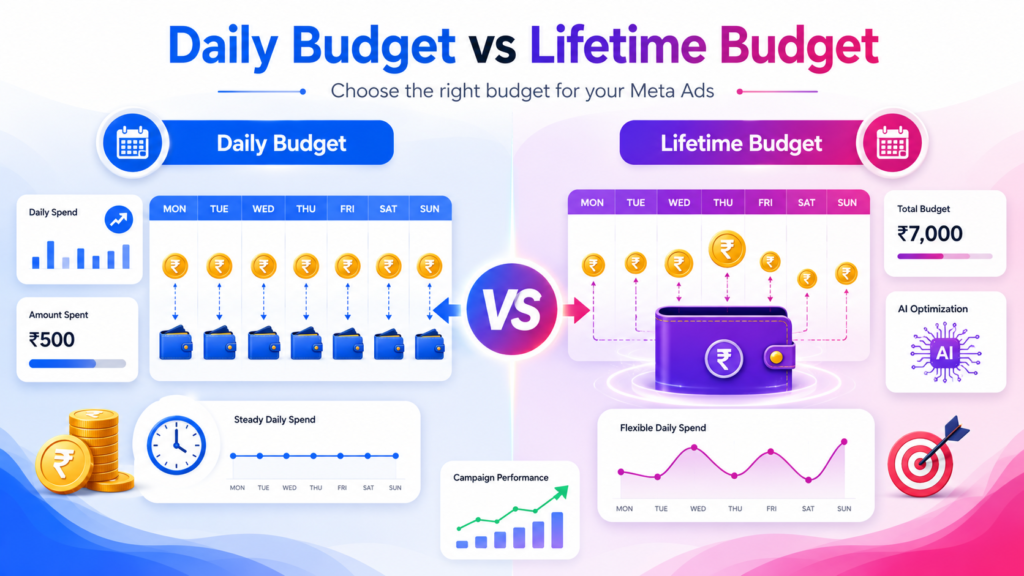
109. What is Daily Budget?
A Daily Budget is the average amount you want Meta to spend on your advertising campaign each day. Meta automatically distributes the budget throughout the day to maximize results based on your campaign objective. This option is ideal for businesses that want continuous advertising while maintaining control over daily spending.
110. What is Lifetime Budget?
A Lifetime Budget is the total amount you want Meta to spend over the entire duration of a campaign. Meta automatically adjusts daily spending based on opportunities to achieve better results while ensuring the total budget does not exceed the specified limit before the campaign ends.
111. What is the difference between Daily Budget and Lifetime Budget?
A Daily Budget limits average spending per day, making it suitable for ongoing campaigns without a fixed end date. A Lifetime Budget sets the total spending limit for the entire campaign period, allowing Meta to spend more on high-performing days and less on slower days while staying within the overall budget.
Daily Budget vs Lifetime Budget
Daily Budget | Lifetime Budget |
Average daily spending limit | Total campaign spending limit |
Best for ongoing campaigns | Best for fixed-duration campaigns |
Consistent daily spend | Flexible spending based on performance |
Easy to control daily costs | Optimizes budget across campaign duration |
112. What is CBO?
CBO (Campaign Budget Optimization) is a feature that allows Meta to automatically distribute the campaign budget across multiple Ad Sets based on performance. Instead of assigning separate budgets to each Ad Set, Meta invests more in the audiences that are generating better results, improving overall campaign efficiency.
113. What is ABO?
ABO (Ad Set Budget Optimization) allows advertisers to assign individual budgets to each Ad Set. This provides greater control over spending and is useful when testing different audiences or ensuring that each audience receives a fixed amount of budget regardless of performance.
114. What is A/B Testing?
A/B Testing, also known as split testing, is the process of comparing two or more versions of an advertisement to determine which performs better. Marketers can test different audiences, creatives, headlines, call-to-action buttons, placements, or landing pages while changing only one variable at a time for accurate comparison.
115. What is Dynamic Creative?
Dynamic Creative is a Meta Ads feature that automatically combines different images, videos, headlines, descriptions, and primary text to create multiple ad variations. Meta tests these combinations and delivers the best-performing versions to the target audience, helping advertisers improve campaign performance without manually creating every variation.
116. How do you optimize a low-performing campaign?
To optimize a low-performing campaign, first analyze key metrics such as CTR, CPC, CPM, Conversion Rate, and Frequency. Identify whether the issue is related to targeting, creatives, ad copy, placements, or the landing page. Refresh ad creatives, refine the audience, test new headlines, improve the offer, and monitor results before making additional changes.
117. How do you scale a successful campaign?
A successful campaign should be scaled gradually to maintain performance. Increase the budget in small increments, expand audience targeting carefully, create Lookalike Audiences, duplicate high-performing Ad Sets when appropriate, and continue testing new creatives. Monitor key metrics closely to ensure that increased spending does not reduce campaign efficiency.
118. What happens if you edit ads frequently?
Frequent edits can reset Meta’s learning phase, causing temporary fluctuations in campaign performance. Every significant change, such as modifying the audience, budget, optimization settings, or creative, requires Meta to gather new data. It is generally better to allow campaigns sufficient time to collect performance data before making major adjustments.
119. What is Primary Text in Meta Ads?
Primary Text is the main message displayed above the image or video in a Meta advertisement. It explains the offer, highlights the value proposition, and encourages users to take action. Effective Primary Text should be clear, concise, engaging, and focused on solving the audience’s problem while including a strong call-to-action.
120. What is the character limit for Primary Text?
Meta does not enforce a strict maximum character limit for Primary Text, but shorter copy generally performs better because users often view advertisements on mobile devices. It is recommended to communicate the key message within the first 125–150 characters, as longer text may be truncated depending on placement and device.
121. What is a Headline in Meta Ads?
A Headline is the short text displayed below the creative in many Meta ad placements. Its purpose is to capture attention quickly and reinforce the main message of the advertisement. A strong headline highlights the primary benefit, offer, or solution and encourages users to click or learn more.
122. What is the character limit for Headlines?
Although Meta supports longer headlines, it is recommended to keep headlines within approximately 40 characters for better visibility across different placements and mobile devices. Short, benefit-focused headlines are easier to read and often achieve better engagement than lengthy headlines.
123. What is Ad Description?
An Ad Description is additional supporting text that appears below the headline in certain Meta ad placements. It provides extra context about the offer, product, or service. While not all placements display descriptions, writing a clear and informative description can improve the overall effectiveness of the advertisement.
124. What is the character limit for Description?
Meta allows flexible description lengths, but keeping descriptions within approximately 30 characters is generally recommended for better display across placements. Short descriptions that reinforce the headline and encourage action tend to perform better on mobile devices.
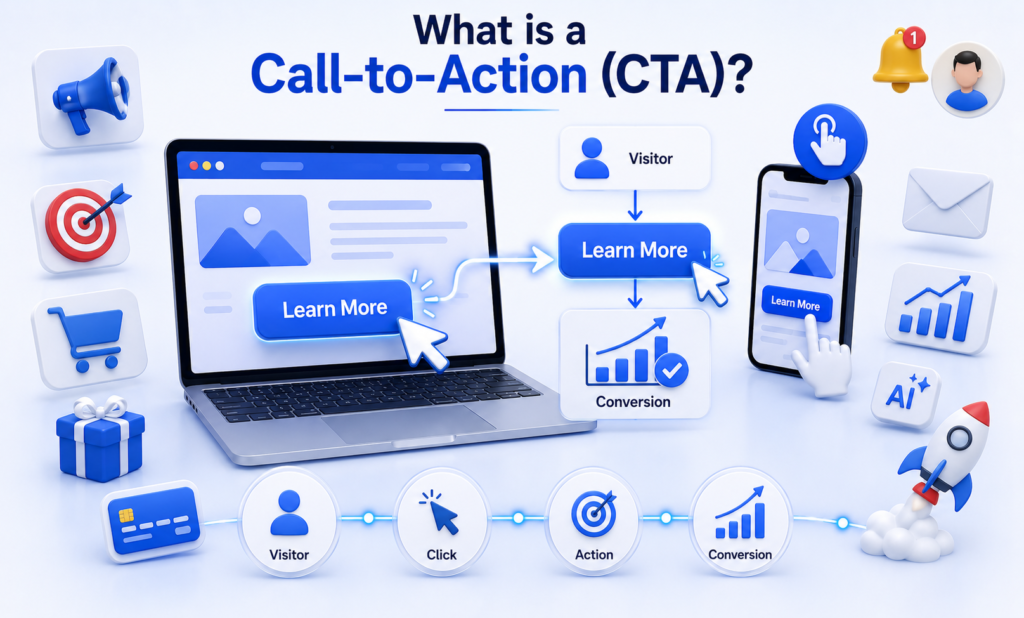
125. What is a Call-to-Action (CTA)?
A Call-to-Action (CTA) is a button or phrase that encourages users to perform a specific action after viewing an advertisement. Common CTA options include Learn More, Shop Now, Sign Up, Book Now, Download, Contact Us, and Get Quote. Choosing the appropriate CTA depends on the campaign objective and business goals.
126. What are the best practices for writing high-converting Meta Ad copy?
High-converting Meta Ad copy should begin with a strong hook that captures attention immediately. Focus on the customer’s problem and explain how your product or service provides a solution. Highlight key benefits rather than only features, keep the language simple, include social proof when possible, create urgency where appropriate, and end with a clear call-to-action. Regular A/B testing of headlines, Primary Text, and creatives helps identify the best-performing combinations.
127. Your campaign is getting clicks but no leads. What will you do?
If a campaign is receiving clicks but not generating leads, I would first analyze the entire conversion journey instead of focusing only on the advertisement. I would check whether the landing page loads quickly, the lead form is easy to complete, the offer matches the ad copy, and the call-to-action is clear. I would also review audience targeting, mobile responsiveness, Pixel tracking, and form fields. Finally, I would run A/B tests on the landing page, ad creatives, and audience segments to identify where users are dropping off.
128. Your Cost Per Lead (CPL) is very high. How will you reduce it?
To reduce a high Cost Per Lead, I would analyze campaign metrics such as CTR, CPC, Conversion Rate, and audience performance. If the audience is too broad or irrelevant, I would refine the targeting. I would also test new creatives, improve the ad copy, simplify the lead form, and optimize the landing page. Regular A/B testing and removing underperforming ads help improve lead quality while lowering the overall CPL.
129. Your ad is approved but not spending. What could be the reasons?
There are several reasons why an approved Meta ad may not spend. Common causes include a very small audience, low campaign budget, restrictive targeting, inactive payment method, account spending limits, overlapping audiences, low bid competitiveness, or a recently launched campaign that is still in the learning phase. I would review campaign diagnostics, audience size, billing status, and delivery recommendations in Meta Ads Manager before making changes.
130. Your CTR is low. How would you improve it?
A low CTR usually indicates that the advertisement is not attracting enough attention or is reaching the wrong audience. I would test new creatives, stronger headlines, and more compelling Primary Text with a clear value proposition. I would also refine audience targeting, experiment with different placements, use engaging visuals or videos, and ensure the Call-to-Action matches the campaign objective. Continuous A/B testing helps identify the highest-performing ad variation.
Conclusion
Preparing for Social Media Marketing Interview Questions is one of the best ways to build confidence and improve your chances of getting hired in 2026. Instead of memorizing answers, focus on understanding the concepts, practicing real-world scenarios, and gaining hands-on experience with tools like Meta Business Suite, Meta Ads Manager, Canva, and AI-powered platforms.
This guide has covered everything from basic Social Media Questions for Interview to advanced Meta Ads Interview Questions, helping you understand organic social media growth, audience targeting, campaign optimization, advertising metrics, and practical interview scenarios. If you’re preparing for SMM Interview Questions or Facebook Interview Questions, make sure you also create your own portfolio by managing an Instagram Business account, a Facebook Page, or running practice Meta Ads campaigns.
To strengthen your overall digital marketing knowledge, explore our Digital Marketing Interview Questions for Freshers and SEO Interview Questions guides.
If you’re preparing for broader Digital Marketing roles, we also recommend reading our Digital Marketing Interview Questions for Freshers and SEO Interview Questions guides to expand your knowledge and improve your interview readiness.
The digital marketing industry changes rapidly, so continuous learning is essential. Stay updated with the latest Instagram features, Facebook algorithm changes, LinkedIn marketing trends, YouTube updates, and Meta Ads best practices. Recruiters value candidates who are curious, adaptable, and committed to learning.
Finally, confidence comes from practice. Read these interview questions multiple times, answer them in your own words, conduct mock interviews with friends or mentors, and practice explaining concepts using real-world examples. The more you practice, the more naturally you’ll respond during interviews.
Keep learning, stay updated with the latest social media trends, practice these Social Media Marketing Interview Questions regularly, and attend mock interviews to improve your communication skills. With consistent practice, practical knowledge, and the right mindset, you’ll be well-prepared to crack your next Social Media Marketing interview and build a successful career in digital marketing.
Frequently Asked Questions (FAQs)
How do I prepare for a Social Media Marketing interview?
Start by learning the fundamentals of Social Media Marketing, Meta Ads, content planning, and analytics. Practice using Meta Business Suite, Canva, and ChatGPT. Build a small portfolio by managing your own social media pages, and practice answering common interview questions confidently with practical examples.
Can freshers get Social Media Marketing jobs?
Yes. Many companies hire freshers for roles such as Social Media Executive, Digital Marketing Executive, Marketing Intern, and Content Creator. Employers usually look for practical knowledge, creativity, communication skills, and familiarity with platforms like Facebook, Instagram, LinkedIn, and Meta Ads rather than years of experience.
Which AI tools should I learn for Social Media Marketing?
Freshers should learn ChatGPT for content creation, Canva AI for graphic design, CapCut AI for video editing, Google Gemini for research, Grammarly for writing improvement, and Meta AI features for campaign optimization. These tools help improve productivity and support day-to-day marketing tasks.
What Meta Ads skills are required for freshers?
Freshers should understand campaign objectives, audience targeting, campaign structure, Meta Pixel, budgeting, placements, ad copy, reporting, and basic optimization techniques. Hands-on practice in Meta Ads Manager provides valuable experience before attending interviews.
What questions do companies ask in Social Media Marketing interviews?
Interviewers usually ask about Social Media Marketing basics, Instagram growth, Facebook Pages, LinkedIn marketing, Meta Ads, campaign objectives, audience targeting, advertising metrics, AI tools, and practical problem-solving scenarios. They may also assess communication and analytical thinking.
Is Meta Ads compulsory for Social Media Marketing jobs?
While not every role requires advanced advertising knowledge, understanding Meta Ads is a valuable skill that improves employability. Many businesses use Facebook and Instagram advertising to generate leads and sales, making Meta Ads knowledge highly desirable for freshers.
What is the average salary of a Social Media Marketing fresher in India?
The salary depends on the company, location, and skill level. Most freshers earn between ₹2.5 LPA and ₹5 LPA, while candidates with strong portfolios, certifications, and practical Meta Ads experience may receive higher salary packages.
Which certifications should I complete before attending interviews?
You can complete certifications in Social Media Marketing, Meta Ads, Google Analytics, Google Ads, Canva, and Digital Marketing. Certifications demonstrate your willingness to learn, but practical implementation and portfolio projects are equally important during interviews.
How can I build a Social Media Marketing portfolio?
Create an Instagram Business account, manage a Facebook Page, design social media creatives, prepare a monthly content calendar, write captions, create Reels, and document your work. Include campaign ideas, analytics screenshots, and sample Meta Ads to showcase your practical skills.
How long should I prepare for a Social Media Marketing interview?
A focused preparation period of 4–8 weeks is usually sufficient for freshers. During this time, learn the fundamentals, practice Meta Ads, improve your communication skills, complete portfolio projects, and participate in mock interviews.