
In today’s competitive online world, data is the backbone of every successful marketing strategy. Whether you’re running ads, optimizing a website, or planning your next content campaign, the ability to track performance and understand user behavior can make or break your results. The good news? You don’t have to invest in expensive software to get powerful insights. There are several free analytics tools that offer accurate data, real-time reporting, and essential metrics to help you make smarter decisions.
For digital marketers, using the right website analytics tool, digital marketing tools, and website performance tools can reveal which channels are working, where users drop off, and what improvements will drive higher conversions. These tools help marketers analyze traffic, monitor SEO performance, understand audience interests, and optimize marketing campaigns — all without spending a single rupee.
In this blog, we’ll explore the Top 5 Free Analytics Tools Every Digital Marketer Should Use to improve their strategy, boost performance, and make data-driven decisions. Whether you’re a beginner, a freelancer, or a marketing professional, these free marketing tools and web analytics tools will help you grow smarter, faster, and more efficiently.
Why Free Analytics Tools Are Essential for Digital Marketers
Free Analytics Tools are essential for digital marketers because they give clear data that helps you understand what is working and what needs improvement. Instead of guessing, you can see real numbers about website visitors, traffic sources, user actions, and conversions. This data helps you plan better strategies, improve content, and manage budgets more wisely. Free Analytics Tools also support small businesses and beginners who want strong insights without spending money on paid platforms. They work perfectly with modern systems like social media dashboards, SEO tools, and even AI Tools for Content Creation, making your marketing process smarter and more efficient.
How Free Marketing Tools Help Improve Website Performance
Free marketing tools help improve website performance by showing how users interact with your site. These tools highlight which pages perform well and which need updates. With this information, digital marketers can quickly fix issues and create a smoother user experience.
Key ways they improve performance:
- Track page loading speed
- Identify high-traffic and low-performance pages
- Measure visitor engagement on each section
- Show pages with high bounce rates
- Help improve conversions through data-driven changes
When you use Free Analytics Tools daily, you can make small updates that bring big results in website performance.
Understanding User Behavior with Web Analytics Tools
Web analytics tools help you understand what your visitors do on your website. They show how long users stay, what pages they visit, and where they exit. This information helps you create a better user experience and improve your content based on real behavior.
These tools help you learn:
- Which pages users visit the most
- What buttons or links get the most clicks
- How long users stay on each page
- Where visitors drop off or lose interest
By using Free Analytics Tools, you can clearly see user patterns and make changes that keep your audience engaged and satisfied.
Benefits of Using Free Tools Before Investing in Paid Software
Using free tools before paying for advanced software is a smart choice for digital marketers. You can learn how analytics work, understand what features matter, and avoid spending money too early.
Main benefits include:
- No cost to start analyzing your website
- Learn important metrics and reports
- Test different platforms before choosing one
- Understand what features you really need
- Avoid paying for tools that you will not use
Free Analytics Tools give a strong foundation for data-driven marketing. Once your business grows, you can upgrade to paid tools with full confidence.
Here are Top 5 Free Analytics Tools
1. Google Analytics – The Most Powerful Free Website Analytics Tool

Google Analytics is one of the most trusted website analytics tool options available for digital marketers. It helps you understand how people visit, browse, and interact with your website. This powerful free platform gives clear insights into traffic sources, conversions, user journeys, and audience behavior. Because of its accuracy and easy interface, Google Analytics is widely used by small businesses, startups, and professional marketers. With new advancements like Google Ai Mode, the tool now provides smarter suggestions to help you improve performance and create better strategies.
Key Web Analytics Metrics Every Marketer Should Track
When using a website analytics tool, these metrics matter the most:
- Users & Sessions – Shows how many people visit your website
- Bounce Rate – Helps identify pages where visitors leave quickly
- Average Session Duration – Measures user engagement time
- Traffic Sources – Tells you where your audience comes from
- Top Pages & Landing Pages – Helps you recognize what content works best
- Goal & Event Tracking – Shows how well your website performs business tasks
Tracking these metrics makes your strategies stronger and more data-driven.
How Google Analytics Helps Improve Website Performance
Google Analytics works as a complete website analytics tool that helps you identify performance issues and improvement areas. It shows slow-loading pages, top exit points, high-bounce pages, and conversion gaps. With this data, marketers can optimize SEO, improve page design, update slow sections, and enhance user experience. Google Analytics also integrates smoothly with tools like Search Console, Ads, and other marketing platforms, making performance tracking easier and more accurate.
Best Features for Small Businesses and Digital Marketing Teams
Google Analytics offers helpful features that support growth, especially for small teams:
- Real-time reporting for instant updates
- Audience insights for understanding user interests
- Behavior flow to track user movements
- Custom dashboards for quick KPI monitoring
- Conversion and event tracking for easy performance measurement
- Integration with Google marketing tools for a complete workflow
These features make it the ideal website analytics tool for marketers who want to improve results without paying for premium software.
2. Google Search Console – A Must-Have Tool for SEO and Website Monitoring
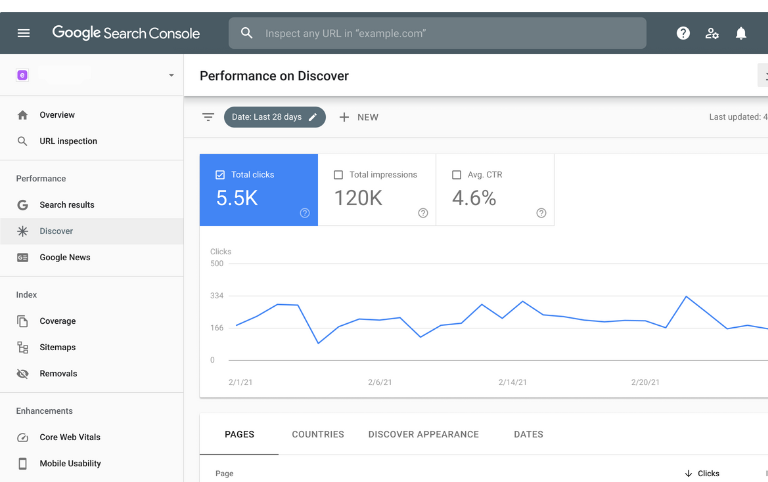
Google Search Console is one of the most useful digital marketing tools for tracking search performance and improving your website visibility on Google. It helps marketers understand how users find their website and what keywords drive traffic. With features like indexing reports, mobile usability, and URL inspection, this tool gives complete control over your site’s search presence. As search engines evolve with new concepts like What Generative Engine Optimization (GEO), having accurate SEO insights is more important than ever.
Why Google Search Console Is Important for SEO Success
Google Search Console supports your SEO strategy in many ways:
- Tracks search keywords and impressions
- Shows pages that rank higher in search results
- Helps identify mobile usability issues
- Offers indexing status for every URL
- Alerts you about crawling or technical problems
These features help marketers use digital marketing tools more effectively and keep their website healthy.
How Google Search Console Helps Improve Search Performance
This tool shows what is working and what needs improvement. It highlights pages with high impressions but low clicks, allowing you to optimize titles and descriptions. Search Console also helps improve website structure by fixing indexing errors and broken pages. By studying keyword trends and user queries, marketers can create better content and enhance their SEO strategy. This makes it one of the most important digital marketing tools for long-term growth.
Best Features for Digital Marketers and Small Businesses
Google Search Console offers features that support both beginners and experienced marketers:
- Keyword performance tracking
- Mobile usability reports
- Index and coverage reports
- Backlink analysis
- URL inspection for technical checks
- Search experience insights
These features make it a reliable digital marketing tools choice for improving SEO and gaining better visibility in search engines.
3. Meta Business Suite Insights – Free Marketing Tools for Social Media
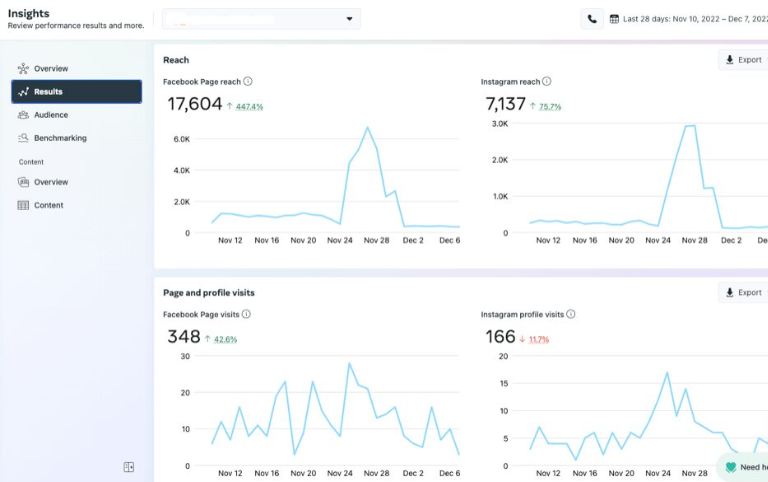
Meta Business Suite Insights is one of the best free marketing tools for tracking and improving your Facebook and Instagram performance. It gives marketers clear data about reach, engagement, follower growth, and content performance without spending money. As search trends evolve with concepts like What is Answer Engine Optimization (AEO), using accurate real-time insights becomes essential for building stronger social media visibility. Meta Insights helps brands understand what works, what doesn’t, and how to create content that performs better across both platforms.
Analyzing Facebook & Instagram Performance for Free
Meta Insights provides deep analytics that help you measure the success of your social media activities. Since it is one of the most valuable free marketing tools, you don’t need paid software to understand your performance.
You can track:
- Post reach and total impressions
- Reels performance and watch time
- Story engagement and tap-forward rate
- Follower growth and demographics
- Profile visits and page actions
- Engagement metrics like likes, comments, and shares
These insights allow you to understand how well your content performs and where improvements are needed.
How to Use Insights to Optimize Social Media Campaigns
Meta Business Suite Insights helps you improve your social media campaigns by showing what type of content your audience enjoys. By reviewing performance data, you can create better posts and plan stronger campaigns using free marketing tools.
You can optimize campaigns by:
- Posting at the best times when your audience is active
- Improving creatives based on top-performing posts
- Adjusting your caption and hashtag strategy
- Testing different content formats like Reels, videos, and carousels
- Using insights to refine ad targeting and boost ROI
This makes campaign planning easier and more accurate.
Audience Behavior and Engagement Analytics
Understanding audience behavior is one of the biggest advantages of using Meta Insights. As one of the leading free marketing tools, it helps you learn how your audience interacts with your content.
It helps you understand:
- Who your audience is (age, gender, location)
- What content creates the highest engagement
- When your followers are most active
- How users respond to Reels, images, and videos
- Which posts drive the most likes, comments, and shares
These analytics help marketers build a stronger content strategy that keeps the audience engaged and encourages steady growth.
4. Google Trends – Real-Time Keyword & Market Insights
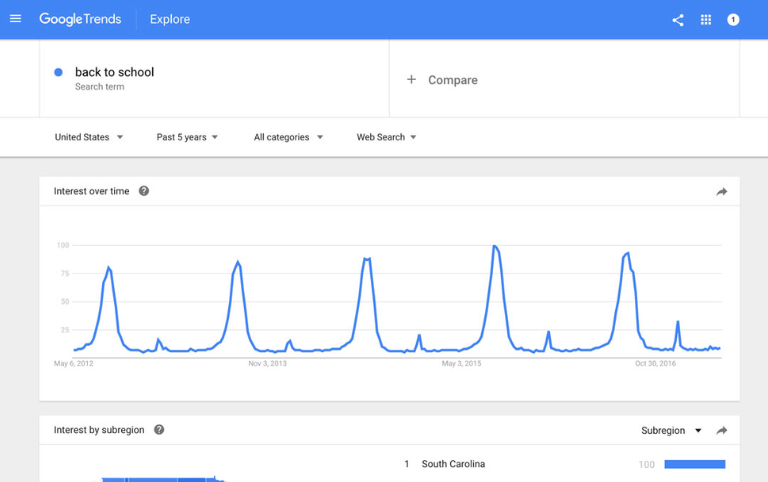
Google Trends is one of the most helpful platforms for understanding what people search for around the world. Although it is not a typical analytics tool, many marketers use it alongside website performance tools to improve SEO, content planning, and audience research. With Google Trends, you can explore real-time data, trending topics, and keyword popularity, which helps you create content that matches user intent. For marketers researching topics like Top 10 Digital Marketing Institutes in Gujarat, Google Trends makes it easy to see search interest and regional patterns. This makes it a powerful tool for predicting market demand and staying ahead of competitors.
Using Google Trends for Content & SEO Strategies
Google Trends supports your SEO and content strategy by showing keyword popularity over time. When used together with website performance tools, it helps identify what your audience wants and how their interests change.
You can use Google Trends to:
- Find trending keywords for blogs and videos
- Identify rising topics to create fresh content
- Select keywords with stable long-term interest
- Discover related queries for broader SEO coverage
- Plan content for the best time of year
These insights help you build a stronger SEO plan based on real-time demand.
- Find trending keywords for blogs and videos
Seasonal Search Trends Every Marketer Should Track
Seasonal trends help marketers understand when users search for certain products, services, or topics. This is useful for planning campaigns, sales, and content calendars. When paired with website performance tools, seasonal insights help you make better decisions.
Seasonal trends include:
- Festival and holiday keywords
- Summer vs. winter product searches
- Education and admission periods
- Travel and tourism spikes
- Shopping events like Diwali, Christmas, and New Year
Tracking these patterns makes it easier to publish content at the right moment.
Comparing Competitors and Market Demand
Google Trends helps marketers compare keyword performance between competitors and understand market interest over time. This supports strategic planning and helps you see where your business stands in comparison.
You can compare:
- Competitor brand searches
- Topic popularity in different regions
- Search interest for similar products
- Market demand over the last 12 months
- Keyword strength between multiple industries
These comparisons help you use website performance tools more effectively and create strategies that match current market behavior.
5. Microsoft Clarity – Free Heatmap & Behavior Analytics Tool
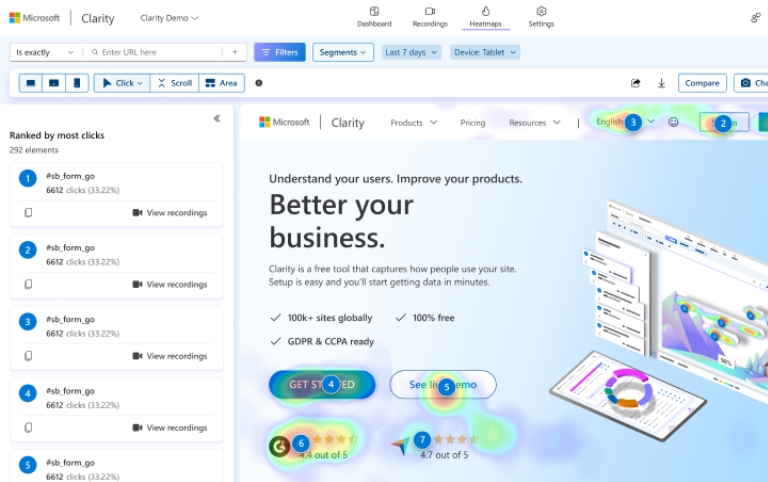
Microsoft Clarity is one of the most powerful web analytics tool options for understanding user behavior and improving website experience. It gives marketers heatmaps, session recordings, and visual user-flow data at no cost. This tool helps identify areas where users struggle, lose interest, or stop engaging. For beginners and professionals learning advanced strategies through a Digital Marketing Course in Ahmedabad, Clarity becomes a valuable support tool for UX and conversion optimization. Its simple interface and strong behavior insights make it one of the most reliable platforms for analyzing how visitors interact with your site.
How Heatmaps Improve UX and Conversion Rates
Heatmaps are one of the most useful features in a web analytics tool, and Microsoft Clarity excels in this area. Heatmaps show where users click, scroll, and move their cursor, helping marketers understand what attracts attention and what gets ignored.
Heatmaps help improve UX by:
- Showing the most clickable areas of a page
- Highlighting ignored buttons or CTAs
- Tracking scroll depth to measure content engagement
- Identifying distracting page elements
- Revealing user patterns that affect conversions
By using heatmap data, you can redesign your pages for better engagement and higher conversion rates.
Session Recordings to Identify User Issues
Session recordings show exactly how users navigate your website. As a web analytics tool, Clarity records user movements, clicks, scrolls, and interactions. This helps you identify real problems that users face.
Session recordings help you:
- Spot technical issues and broken elements
- Understand where users struggle on forms
- Reduce clutter and improve page structure
- Identify rage clicks and frustration points
- Enhance user flow to support conversions
These insights make it easier to solve issues quickly and improve your website’s overall performance.
Improving Website Performance with Clarity Data
Microsoft Clarity provides behavior insights that help improve website speed, design, and structure. When used as a web analytics tool, it highlights patterns that reduce engagement and identifies areas where users drop off.
Clarity helps improve performance by:
- Showing pages with high exit rates
- Tracking user behavior on slow-loading pages
- Identifying layout issues that reduce engagement
- Helping optimize navigation and user paths
- Providing data that supports A/B testing decisions
These improvements lead to better user experience, stronger engagement, and higher conversion rates.
Conclusion
Free analytics platforms are becoming essential for every marketer, business owner, and content creator. Tools like Google Analytics, Google Search Console, Meta Business Suite, Google Trends, and Microsoft Clarity give you powerful insights without any cost. These tools help you understand user behavior, improve performance, track campaigns, and make smarter decisions. By using these free solutions consistently, you can optimize your website, refine your social media strategy, and strengthen your overall digital presence.
The best part is that all these tools work together to give a complete view of your online performance. Whether you want to grow traffic, increase engagement, boost conversions, or plan better content, these tools provide the data needed to improve results. Even students and beginners learning through a Digital Marketing Course in Surat can easily use these tools to build strong, practical skills.
When combined with good content, strategic planning, and continuous analysis, free analytics tools can help you grow faster, stay competitive, and achieve long-term success in the digital world.
FAQS
What are the best free analytics tools for digital marketers?
The best free analytics tools include Google Analytics, Google Search Console, Google Trends, Ubersuggest (free version), and Hotjar Basic. These tools help track website performance, keyword rankings, user behavior, and content trends—making them essential for improving SEO, conversions, and audience insights without spending money.
Why should digital marketers use free analytics tools?
Free analytics tools provide real-time insights into website traffic, user behavior, keyword performance, and market trends. They help marketers optimize content, improve SEO, and plan better campaigns. Since they cost nothing, they are perfect for beginners, small businesses, and marketers wanting data-driven decisions without paid tools.
How does Google Analytics help digital marketers?
Google Analytics tracks user behavior, traffic sources, session duration, conversions, and engagement. It helps marketers understand what content performs best, which pages drive results, and where users drop off. These insights support SEO improvements, audience targeting, ad optimization, and overall digital marketing strategy development.
What is Google Search Console used for in marketing?
Google Search Console helps marketers monitor website indexing, keyword ranking, search queries, and technical issues. It shows which keywords bring traffic, identifies errors affecting SEO, and helps improve visibility on Google. It’s crucial for optimizing website performance and maintaining healthy search rankings.
How does Google Trends support SEO strategy?
Google Trends shows real-time keyword popularity, seasonal patterns, rising topics, and regional interest. Marketers use it to find trending content ideas, target relevant keywords, and stay ahead of competitors. It helps align content with user intent and improves overall website visibility and traffic.
Is Ubersuggest a useful free tool for digital marketing?
Yes, Ubersuggest’s free version provides keyword ideas, domain overview, SEO difficulty, content suggestions, and backlink data. It’s helpful for researching blog topics, improving SEO strategies, and analyzing competitors. Though limited compared to the paid plan, it remains one of the most accessible free SEO tools.
What does Hotjar’s free plan offer to marketers?
Hotjar’s free plan provides heatmaps, basic session recordings, and feedback tools. Marketers use it to understand user behavior, identify UX issues, and improve website design. It helps reveal where users click, scroll, or drop off, leading to better conversion rate optimization and overall user experience.
Which free analytics tool is best for keyword research?
For free keyword research, Ubersuggest, Google Trends, and Google Keyword Planner work best. They reveal search volume, keyword difficulty, trending topics, and user intent. These insights help marketers choose high-performing keywords for blogs, ads, and SEO strategies.
Can free analytics tools replace paid marketing tools?
Free analytics tools offer powerful insights suitable for beginners and small businesses. While they cannot replace advanced paid tools entirely, they cover essential data like SEO performance, traffic analysis, and behavior tracking. Many marketers use free tools initially and upgrade as their needs grow.
How do free analytics tools improve digital marketing performance?
Free analytics tools provide data on traffic, keywords, user behavior, competition, and content performance. Using these insights, marketers can optimize SEO, improve engagement, fix technical issues, and plan targeted campaigns. This leads to higher visibility, better user experience, and improved conversions without additional cost.